Keyboard Handling
How TrueSheet handles keyboard visibility.
TrueSheet handles keyboard visibility natively on both iOS and Android. When a TextInput inside the sheet is focused, the sheet automatically adjusts to keep the input visible above the keyboard.
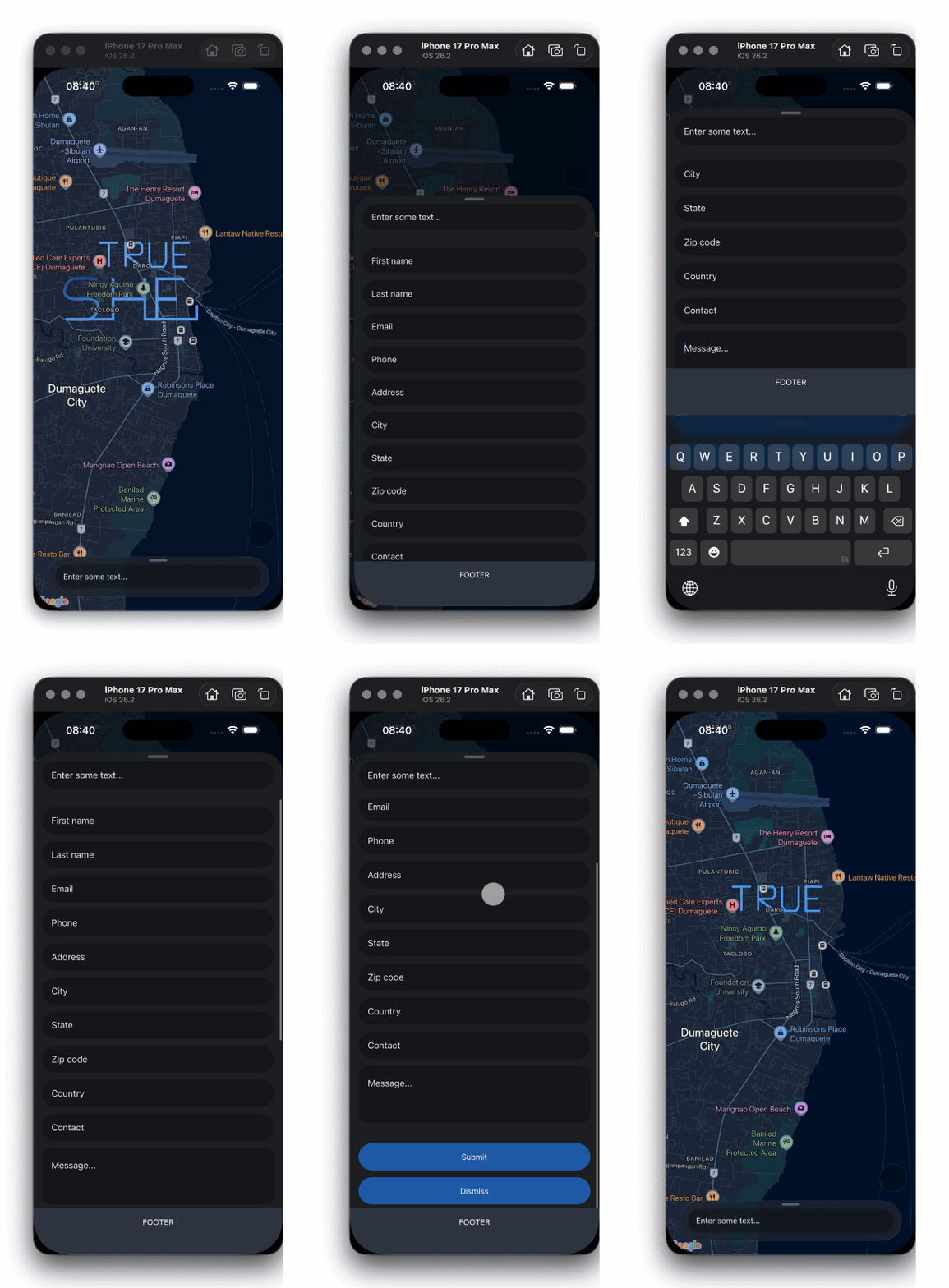
How?
The keyboard handling is built into the native implementation:
- iOS: Uses
UISheetPresentationController's built-in keyboard avoidance - Android: Tracks keyboard height via
WindowInsetsAnimationCompatand reconfigures sheet detents in real-time
No additional configuration is required. Simply add your TextInput components inside the sheet:
const App = () => {
  return (
    <TrueSheet ref={sheet} detents={['auto']}>
      <View style={{ padding: 16 }}>
        <TextInput
          placeholder="Type something..."
          style={{ borderWidth: 1, borderColor: '#ccc', padding: 12, borderRadius: 8 }}
        />
      </View>
    </TrueSheet>
  )
}
Scrollable + Keyboard
When your sheet contains a ScrollView or FlatList (provided via scrollableRef), keyboard handling works out of the box. If a TextInput inside a ScrollView is focused, the sheet automatically scrolls to keep the input visible above the keyboard — no extra setup needed.
You can use keyboardScrollOffset in scrollableOptions to add extra spacing between the focused input and the keyboard:
<TrueSheet scrollableOptions={{ keyboardScrollOffset: 16 }}>
  <ScrollView>
    <TextInput placeholder="Input 1" />
    <TextInput placeholder="Input 2" />
    <TextInput placeholder="Input 3" />
  </ScrollView>
</TrueSheet>
This is especially useful for forms with multiple inputs — as the user taps between fields, the scroll view adjusts automatically to keep the active input in view.
While the keyboard is open, the scrollable gets a bottom inset matching the keyboard height. If your content renders its own bottom padding (e.g. you opted out of contentInsetAdjustment and applied safe-area padding via paddingBottom), that padding stacks on top of the inset and leaves a gap above the keyboard. Use keyboardOffset to adjust the inset — pass a negative value to cancel out the padding:
const insets = useSafeAreaInsets()

<TrueSheet scrollableOptions={{ keyboardOffset: -insets.bottom }}>
  <ScrollView contentContainerStyle={{ paddingBottom: insets.bottom }}>
    <TextInput placeholder="Input 1" />
  </ScrollView>
</TrueSheet>
Footer Behavior
A relative footer (the default) stays in the layout flow — it doesn't float above the keyboard. The keyboard simply covers it, and it's revealed again when the keyboard hides.
An absolute footer automatically repositions above the keyboard, staying visible while the user types. The automatic scroll accounts for the footer's height — focused inputs clear both the keyboard and the footer. Its built-in safe-area inset is skipped while the keyboard is open — the footer hugs the keyboard with no gap, and the inset is restored when the keyboard hides.
If your absolute footer renders its own bottom padding, that padding leaves a gap above the keyboard. Use keyboardOffset in footerOptions to adjust the rise — pass a negative value to tuck it behind the keyboard:
<TrueSheet footer={<Footer />} footerOptions={{ position: 'absolute', keyboardOffset: -16 }}>
  {/* ... */}
</TrueSheet>
The footer slides up by the keyboard height plus keyboardOffset. A negative value reduces the rise so the padding sits behind the keyboard; a positive value raises the footer higher.
Set avoidKeyboard to false to keep an absolute footer at the bottom edge of the sheet:
<TrueSheet footer={<Footer />} footerOptions={{ position: 'absolute', avoidKeyboard: false }}>
  {/* ... */}
</TrueSheet>
The keyboard covers the pinned footer. With footer inset adjustment enabled, any footer portion above the keyboard still adds scroll padding and contributes to the expanded auto height. A fully covered footer adds no extra space above the keyboard. The footer keeps its safe-area padding, and keyboardOffset has no effect.
Autofocus Limitation
Avoid using autoFocus on TextInput components inside the sheet. The keyboard may appear before the sheet has finished presenting, causing layout issues.
Instead, focus the input programmatically after the sheet has presented:
const inputRef = useRef<TextInput>(null)

const handlePresent = () => {
  inputRef.current?.focus()
}

<TrueSheet onDidPresent={handlePresent}>
  <TextInput ref={inputRef} placeholder="Type something..." />
</TrueSheet>